

On October 28, 2026, Hoteam Software held its global online CrownCAD 2027 launch, themed around strengthening CAD foundations and opening new possibilities with AI. IDENIFE Holdings joined as a partner to present its industrial design AI research and integration work. The event showcased HuanYu AI's integration with Hoteam's high-end industrial styling software, CrownStyling. The HuanYu API has been integrated into CrownStyling, bringing generative AI for industrial design into a professional 3D styling environment.
From industrial design experience to AI and software integration
At the launch, Liu Jianzhuang, General Manager of IDENIFE Holdings, introduced HuanYu as a specialized generative model for industrial design, developed from IDENIFE's experience delivering design projects. In practice, the challenge extends beyond producing an appealing image. It involves understanding a brief, organizing design conditions and turning generated results into proposals that designers can discuss and develop further.
The collaboration brings this work into professional software. Designers express their product intent; HuanYu helps clarify requirements, explore appearance and generate 3D concepts. CrownStyling provides tools for subsequent work on volume, silhouette and surface detail. The shared focus is the handover between design stages, allowing early ideas to inform later professional work.
Integrating HuanYu into CrownStyling marks an important step from design experience to domain AI workflows and their implementation in industrial software. Its practical value must be assessed through real tasks and continued use: whether requirements are clear, alternatives are comparable and 3D results help designers make their next decision.
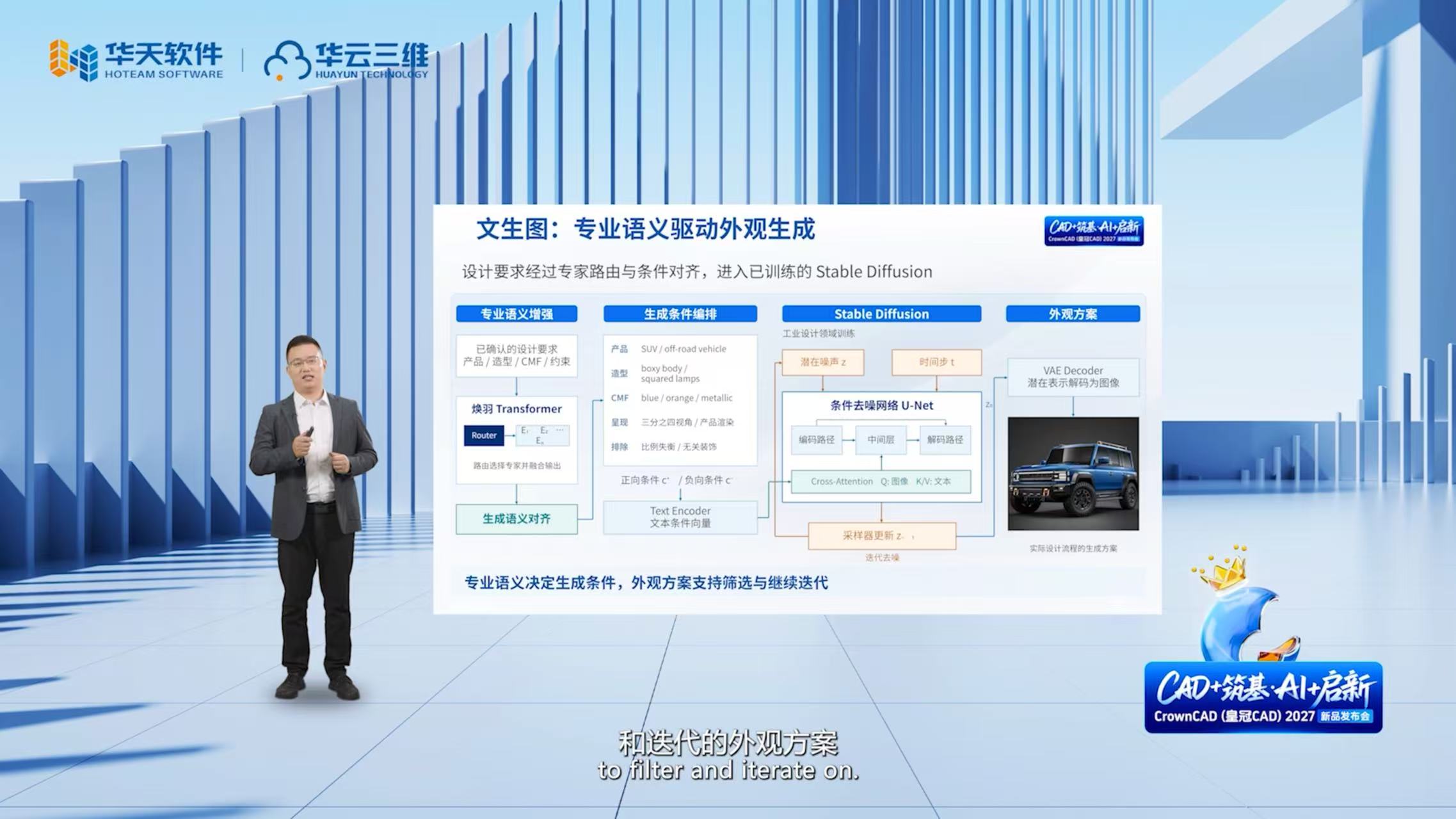
Help AI understand design, and connect creative ideas with professional tools.
Complementary capabilities connect exploration with styling development
Industrial design combines exploration of product identity, usage contexts and aesthetic direction with close attention to form relationships, surface quality and constraints. These activities belong to the same process, but they require different tools and evaluation criteria.
HuanYu focuses on understanding requirements, exploring directions and expressing concepts. It organizes product goals, styling language, color and material directions, and constraints into generation conditions. CrownStyling addresses professional styling through subdivision surfaces, curves, surfaces, fairing and rendering, supporting further work on proportion, silhouette, curvature and the behavior of highlights. IDENIFE's HuanYu research page also provides an entry point to design semantics, conditional generation and evaluation.
The relationship follows a practical sequence: design intent informs an appearance direction, the selected direction becomes a 3D concept, and professional tools support further styling development. Generated results provide a starting point for discussion; designers decide which features to retain and which areas to reconstruct. Connecting these capabilities in one working environment helps exploration and later revisions stay aligned with a common brief.
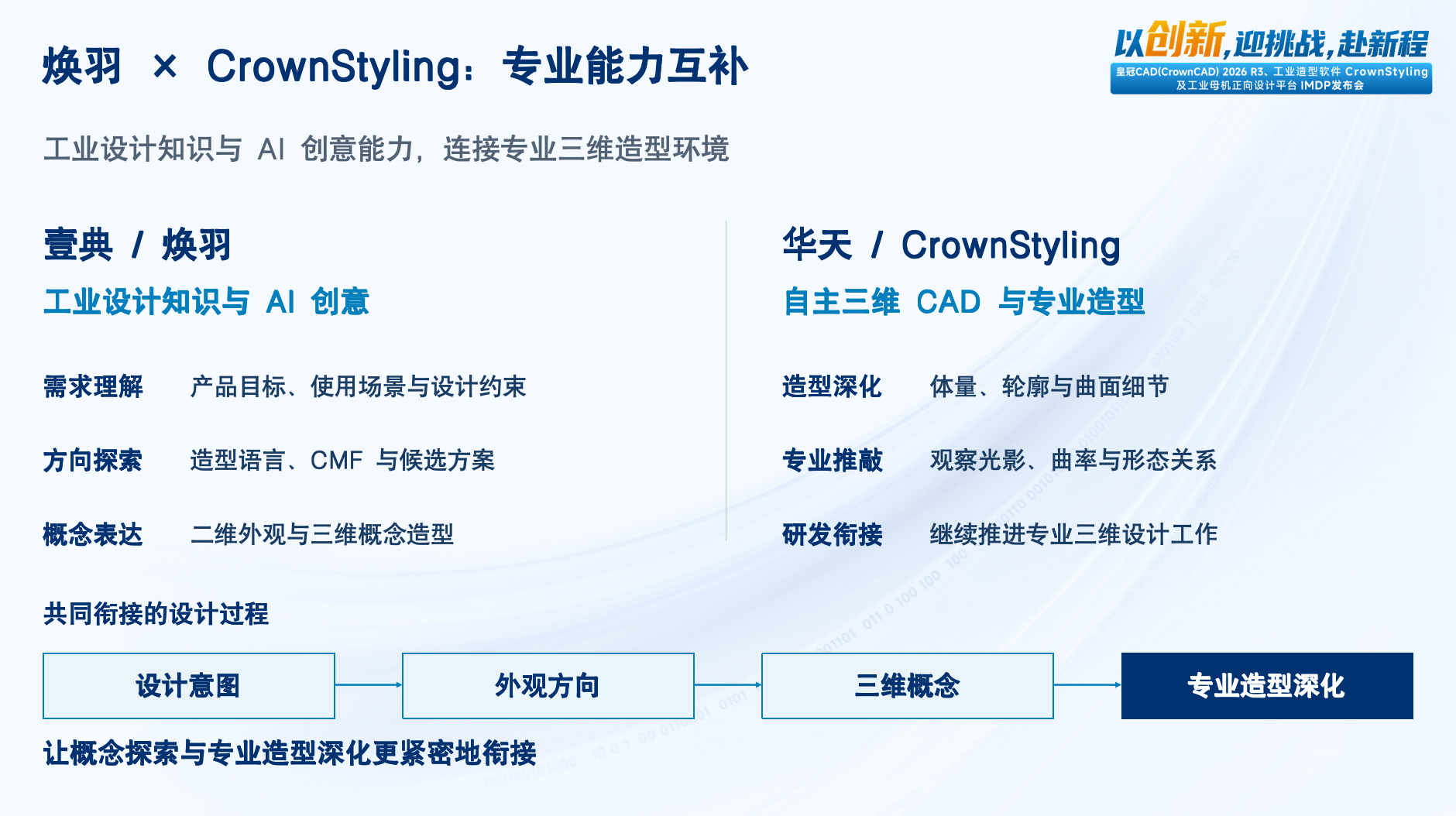
Confirm the brief before generation
A design brief rarely arrives as a complete parameter set. A user might ask for a rugged, powerful SUV with a blue body and orange accents, then gradually add preferences, usage contexts and unwanted features through further discussion. The system needs to relate these inputs while retaining conditions that remain unresolved.
The HuanYu technical demonstration combines Transformer-based language understanding with expert routing to organize the brief. Natural language and context are encoded and interpreted through industrial design semantics. The output is a structured set of requirements covering product type, styling direction, CMF—color, material and finish—and boundary constraints, followed by user confirmation.
Confirmation matters directly to the design. For example, metallic paint and a glossy reflection describe appearance and surface treatment; they do not establish the material from which a physical component must be made. The demonstration retains material direction as an item requiring confirmation. Similarly, a sense of strength needs to be expressed through proportion, silhouette and details. Separating confirmed conditions from open questions helps prevent the system from silently making decisions on the user's behalf.
The confirmed requirements become a shared input for subsequent image and 3D concept generation. This gives review discussions a traceable basis: which requirement led to a feature, which condition changed in a revision and whether a result has departed from the agreed direction. Understanding the brief therefore continues through selection and iteration.
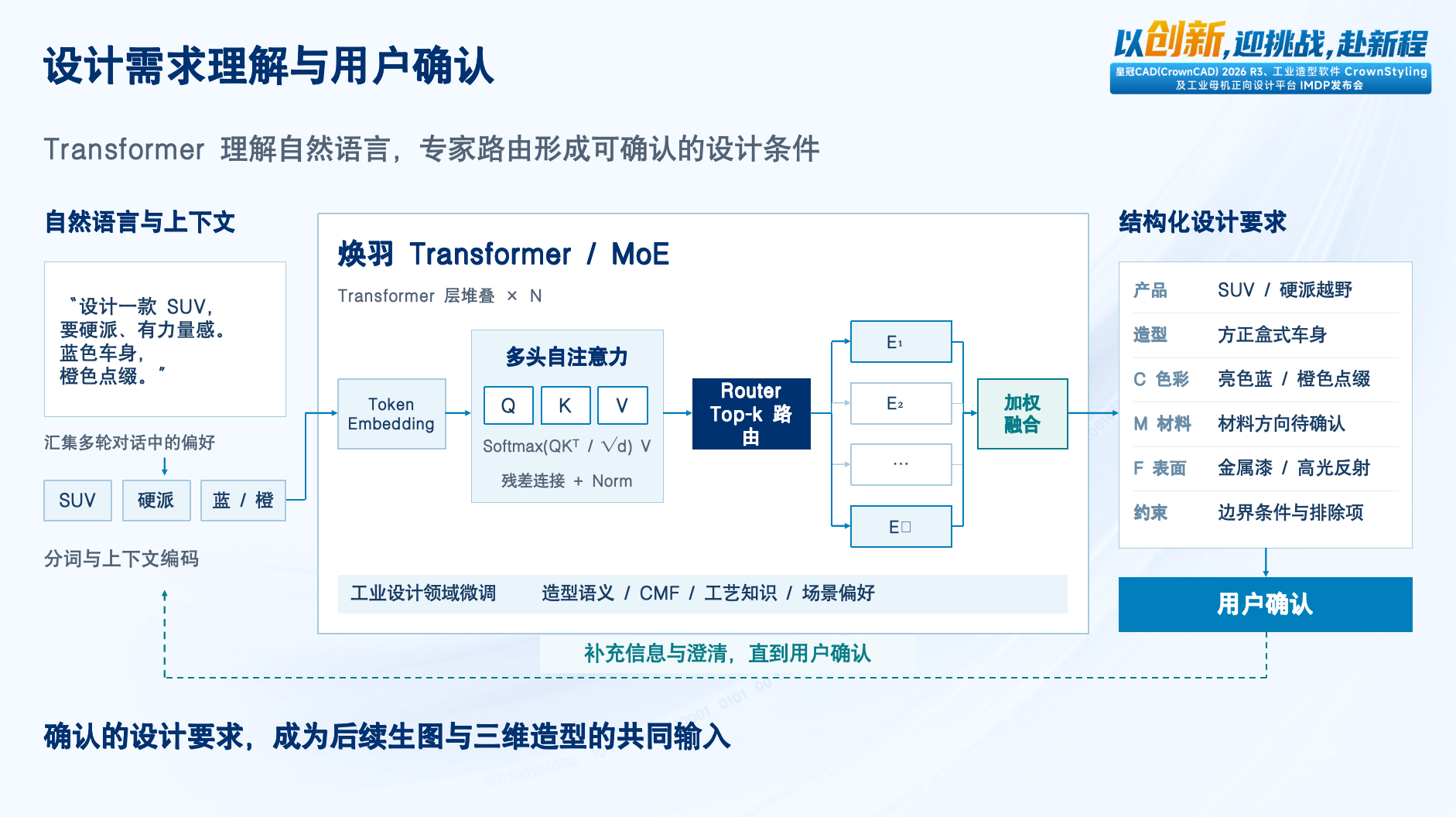
Translate design semantics into comparable appearance proposals
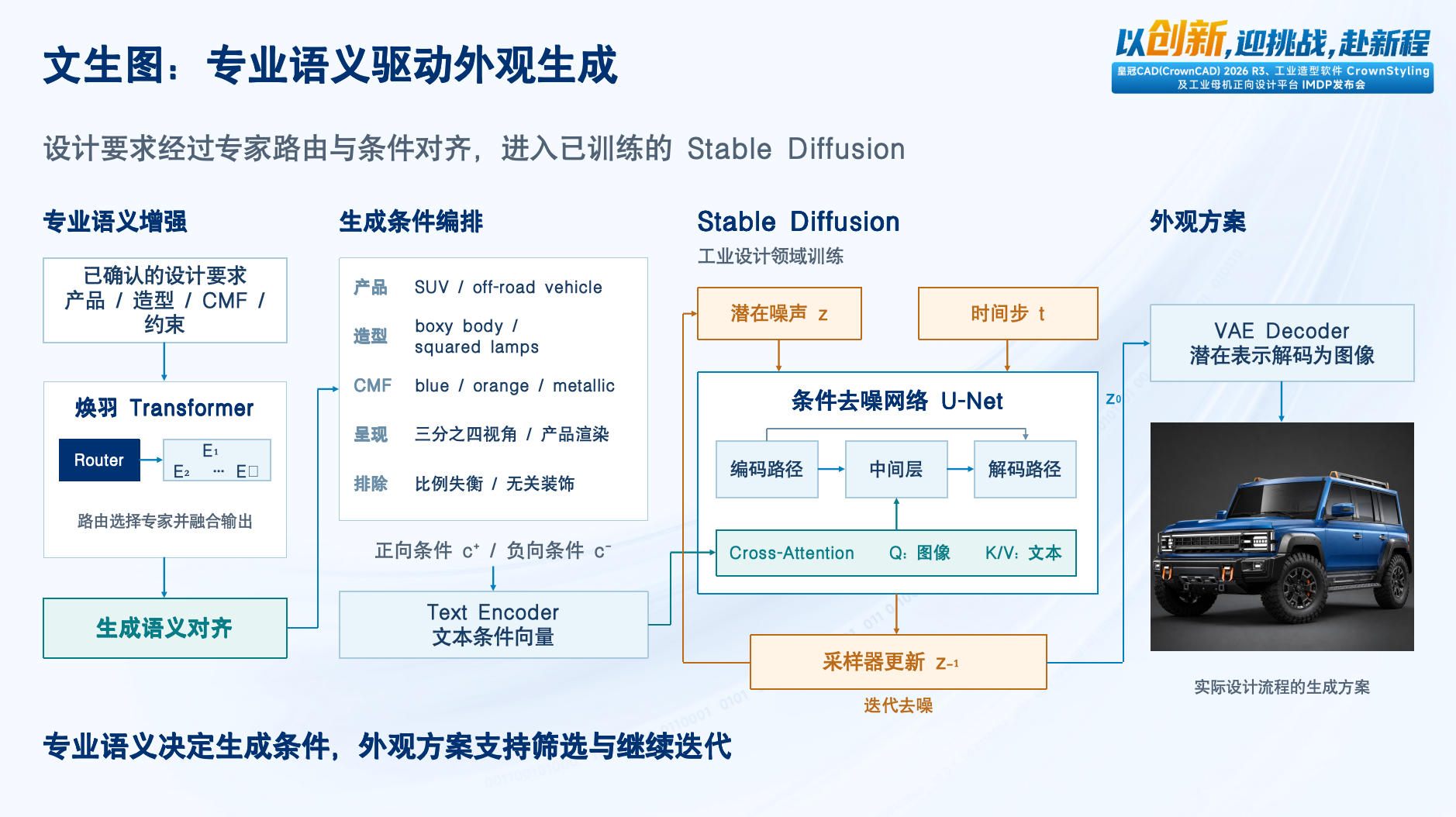
Moving from a brief to an appearance image requires a translation between forms of expression. Product type, styling features, CMF, presentation view and exclusions are organized into conditions a generative image model can use. A rugged SUV direction, for instance, can be expressed through a boxy body, a particular lighting signature, blue and orange colors, and a product-rendering view, alongside constraints against distorted proportions or unrelated decoration.
The technical demonstration connects domain semantic enhancement and condition orchestration with Stable Diffusion trained for industrial design. A text encoder represents the conditions as vectors; a conditional denoising network uses them during iterative generation; a decoder produces the image. The design objective is to keep these conditions consistent with the confirmed brief.
Comparison then returns to that brief. Does the main proportion fit the goal? Are recognizable features retained? Do color and surface effects work together? Does the image communicate the principal form clearly? Selecting a direction means it is worth developing, rather than treating a single rendering as a complete design decision. Designers can use these questions to select proposals, adjust conditions and iterate.
Generate shape and material in stages, then check key contours
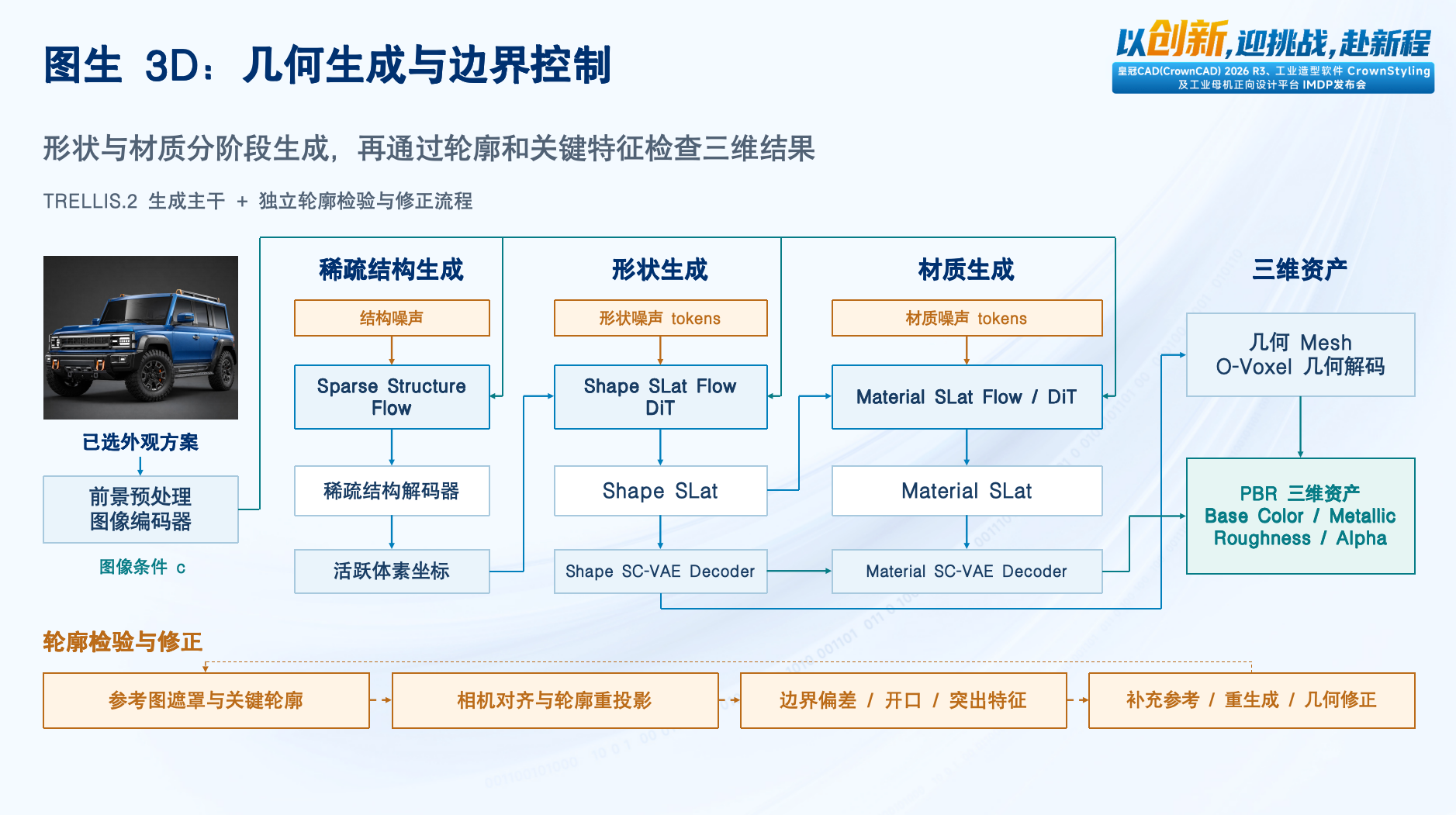
Once an appearance direction is selected, image-to-3D generation turns a 2D expression into a concept asset that can be inspected from multiple viewpoints. The demonstrated workflow uses Microsoft's open-source TRELLIS.2 as its generative backbone, alongside a separate contour-checking and correction process. The domain work includes applying the model, organizing task-specific inputs, inspecting results and addressing deviations.
The workflow processes the foreground and image conditions, then generates a sparse structure, a shape representation and a material representation before decoding them into mesh and material assets. Shape describes spatial volume and surface structure; material describes properties such as base color, metallic response and roughness. Handling them in stages makes geometry and appearance easier to inspect separately, reducing the risk of treating shading in an image as reliable structural detail.
The 3D result must also be compared with its reference. The demonstrated checks include a reference mask and key contours, camera alignment and silhouette reprojection, followed by inspection of boundary deviations, openings and protruding features. Additional references, regeneration or geometry correction can then be selected according to the problem. A material change cannot repair an incorrect overall proportion, and a close silhouette match in one view does not establish reliability from every other view.
A single image cannot fully constrain hidden surfaces or internal structure. Generated assets therefore retain uncertainty that requires a designer's judgment. IDENIFE's image-to-3D capability page likewise describes the application as a transition from 2D images to 3D assets. For industrial design, the aim is to produce a concept reference that can be inspected, compared and developed, while preserving a clear boundary between concept generation and engineering design.
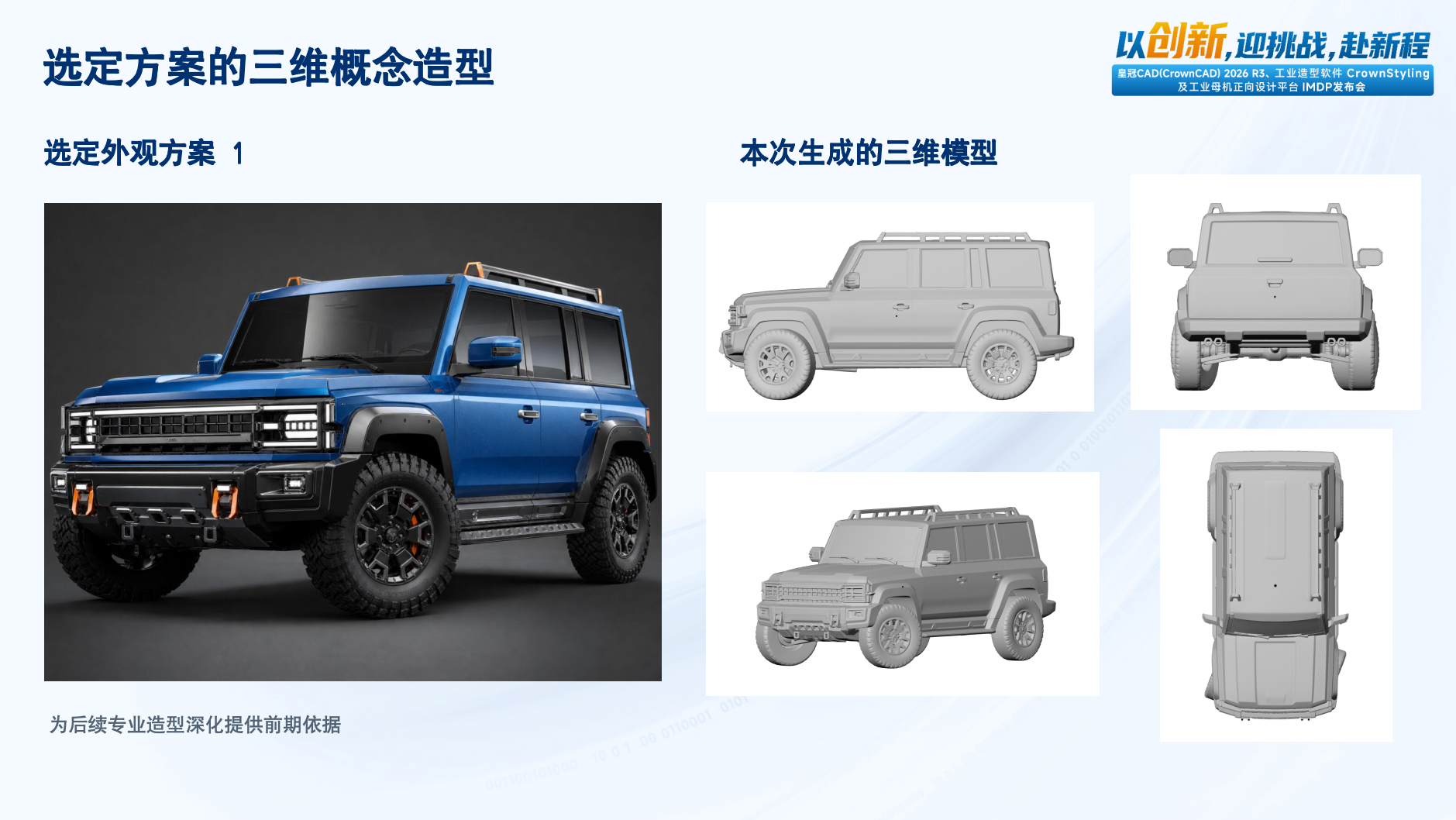
The SUV example: from one rendering to a multi-view discussion
The SUV concept demonstration uses a rugged, powerful direction with a boxy body, a blue main color and orange accents. These preferences are organized into design conditions to generate appearance proposals. A selected proposal is then used to generate a 3D concept, shown in side, front, top and perspective views to communicate silhouette, volume and detail relationships.
Multiple views make the discussion more specific. A side view helps examine proportions and transitions along the body; a front view helps assess left-right relationships and principal features; a top view adds plan-form information that a single perspective rendering may not communicate clearly. Presenting the geometry as a gray model also directs attention toward volume and form, reducing the influence of color and reflections on the review.
These views support concept review; they are not dimensioned engineering drawings. The example demonstrates a connection between design intent and 3D expression. Decisions about changing proportions, adding detail or rebuilding a local form remain subject to design goals and professional assessment. The role of 3D generation is to give the next discussion a more tangible shared object.
Let CrownStyling support the next stage of professional design
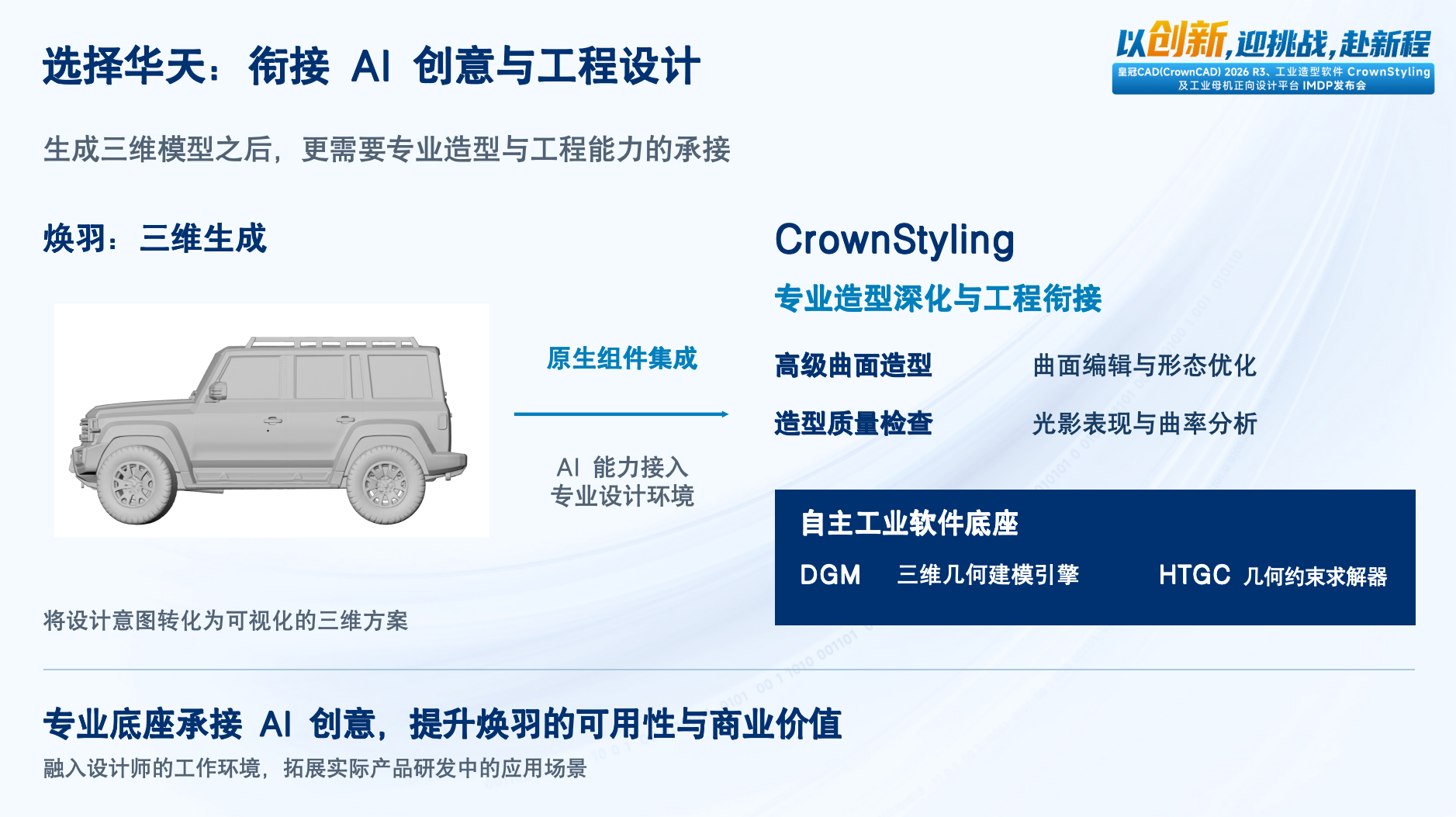
Integrating the HuanYu API into CrownStyling brings generative design into a professional styling environment. The demonstration describes this as native component integration: AI supports concept exploration and 3D expression, while CrownStyling provides tools for further work. Designers continue with surface editing, form refinement and styling quality checks.
At this stage, the questions extend beyond resemblance from a particular viewpoint. They include whether silhouettes connect naturally, surface transitions are appropriate and changes in highlights reveal local problems. Hoteam's software technology includes the DGM 3D geometric modeling engine and the HTGC geometric constraint solver, providing a foundation for professional geometry processing. Generative and professional software capabilities serve complementary roles.
A generated mesh does not automatically become parametric CAD with a complete modeling history, nor does it establish that a product is ready for manufacturing. For a specific product, surface development, structural design, dimensional and assembly constraints, and material and manufacturing feasibility still require professional teams and appropriate tools. A clear handover, with explicit responsibilities and evidence, helps AI concepts enter product development on a sounder basis.
Build on product integration through real design work
The HuanYu–CrownStyling integration illustrates a practical route for industrial design AI: build capabilities around professional tasks and connect them to the tools designers use. IDENIFE's design experience, organization of domain semantics and generation workflows connect with Hoteam's styling software to support the transition from exploration to further design development.
Continued evaluation should ask whether each stage produces something the next stage can use. Can requirements be confirmed? Can alternatives be compared? Can 3D results be inspected? Do later revisions preserve the original intent? These concrete questions are closer to the daily needs of design teams than the number of generated outputs alone.
IDENIFE will continue developing HuanYu's industrial design capabilities through real requirements and application feedback, working on coordination between models, toolchains and professional software with its industry partners. Helping AI understand design and connecting creative ideas with professional tools remain the direction of this collaboration.